 Jeena
27ce5c7741
Jeena
27ce5c7741
Single user-visible fix since v3.0.0: the login dialog keeps the attempted credentials after a failed login instead of coming back empty. |
||
|---|---|---|
| data | ||
| html | ||
| src | ||
| .gitignore | ||
| .travis.yml | ||
| build.rs | ||
| Cargo.lock | ||
| Cargo.toml | ||
| COPYING | ||
| install.sh | ||
| README.md | ||
FeedTheMonkey

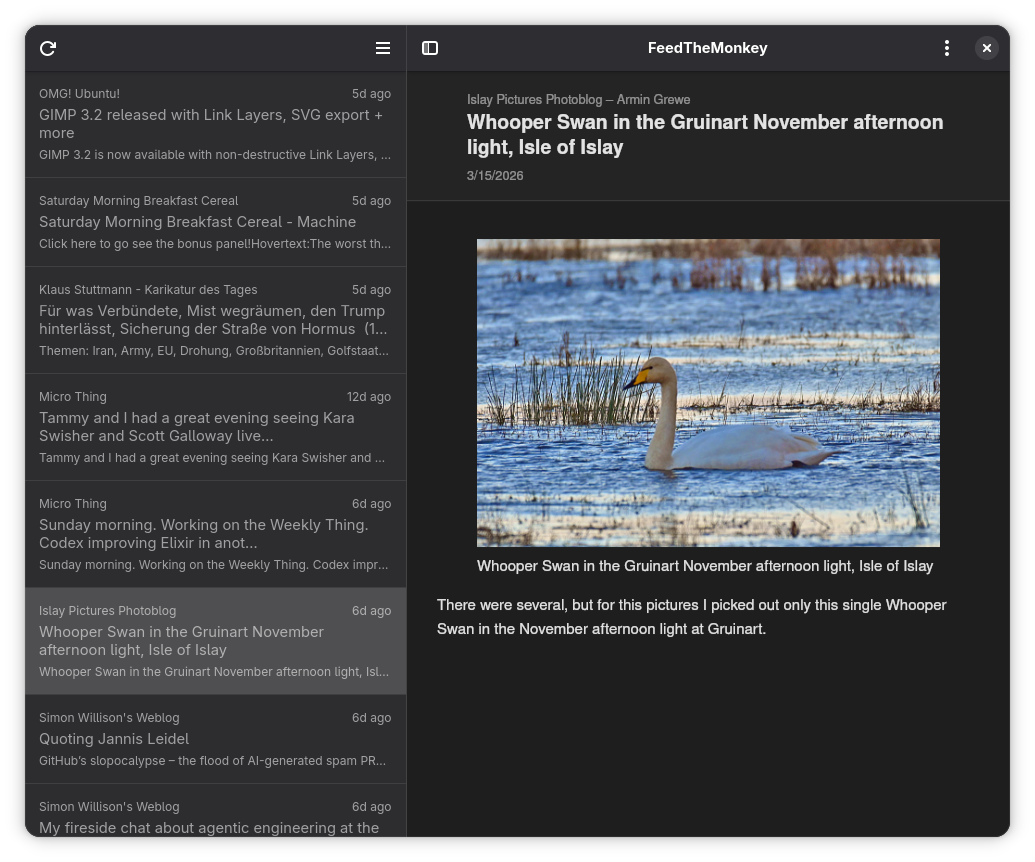
FeedTheMonkey is a desktop client for any server that implements the Greader API.
It doesn't work as a standalone feed reader — it connects to a server to fetch articles and sync read state.
It follows the river of news philosophy: all unread articles appear in a single flat list and are automatically marked as read as you flip through them one by one.
Features
- River of news: all unread articles in one flat list, auto-marked as read as you flip through them one by one
- Offline reading: article content and images are cached locally so you can read without a connection
- Image caching: images are pre-fetched after each reload; can be disabled in preferences and is always skipped on metered connections
- Offline sync: read/unread state changes made offline are queued and pushed to the server next time you're online
- Persistent state: the article list, selected article, and scroll position are restored when you reopen the app
- Dark mode: follows the system color scheme automatically
- Keyboard navigation: vi-style shortcuts for hands-free reading
- Zoom: adjustable content zoom, persisted across restarts
- Fullscreen and toggleable sidebar
When logging in, enter:
- FreshRSS:
https://example.com/api/greader.php - Miniflux:
https://example.com - Other compatible servers: consult your server's documentation for the Greader API endpoint
Dependencies
Runtime
- GTK 4 (
gtk4) - libadwaita (
libadwaita) - WebKitGTK 6 (
webkitgtk-6.0) - GLib / GIO (
glib-2.0,gio-2.0)
On Arch Linux: sudo pacman -S gtk4 libadwaita webkitgtk-6.0
Build
- Rust toolchain (
rustup/cargo) blueprint-compiler— compiles.blpUI files to.uiglib-compile-schemas— compiles GSettings schemas (part ofglib2)glib-compile-resources— compiles GResource bundles (part ofglib2)
On Arch Linux: sudo pacman -S blueprint-compiler glib2
Building
cargo build --release
The binary is at target/release/feedthemonkey.
Installing
sudo ./install.sh
This installs the binary, icon, desktop entry, and GSettings schema to /usr/local.
Set PREFIX to install elsewhere:
sudo PREFIX=/usr ./install.sh
Trivia
This is version 3 of FeedTheMonkey, rewritten in Rust with GTK4 and libadwaita.
Version 2 was written in C++ with Qt and QML, and version 1 in PyQt — you can find
them in the v2 and v1 branches of this repo.
Screenshot
Keyboard shortcuts
| Key | Action |
|---|---|
j or → |
Next article |
k or ← |
Previous article |
Return |
Open in browser |
r |
Reload |
F11 |
Toggle fullscreen |
Ctrl+W |
Quit |
Ctrl++ |
Zoom in |
Ctrl+- |
Zoom out |
Ctrl+0 |
Reset zoom |
License
Copyright 2015–2026 Jeena
FeedTheMonkey is free software: you can redistribute it and/or modify it under the terms of the GNU General Public License as published by the Free Software Foundation, either version 3 of the License, or (at your option) any later version.