 Jeena
9a4bf4b9f8
Jeena
9a4bf4b9f8
Set unread bold state directly in bind() instead of relying on
obj.notify("unread"), which was unreliable during list factory binding
(GLib may defer or drop notifications during initial bind).

Also add a right-click context menu on each article row with a single
"Mark as Unread" item. The menu is a GtkPopover positioned at the
cursor. Clicking it activates the new win.mark-article-unread action,
which takes the article ID as a string parameter and reuses the
existing mark-unread logic.

Refactor do_mark_unread() to delegate to the new do_mark_article_unread()
so the behaviour is consistent whether triggered from the toolbar button,
keyboard shortcut, or right-click menu.
|
||
|---|---|---|
| data | ||
| html | ||
| src | ||
| .gitignore | ||
| .travis.yml | ||
| build.rs | ||
| Cargo.lock | ||
| Cargo.toml | ||
| COPYING | ||
| install.sh | ||
| README.md | ||
FeedTheMonkey

FeedTheMonkey is a desktop client for any server that implements the Greader API.
It doesn't work as a standalone feed reader — it connects to a server to fetch articles and sync read state.
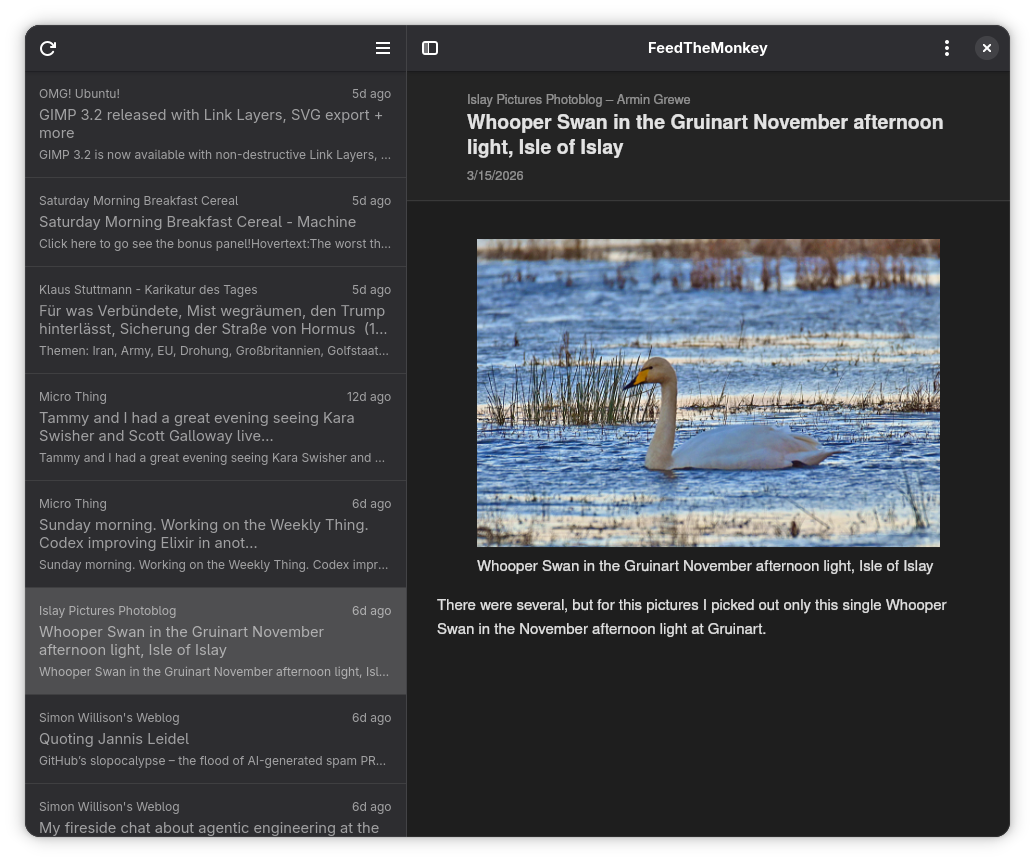
It follows the river of news philosophy: all unread articles appear in a single flat list and are automatically marked as read as you flip through them one by one.
Features
- River of news: all unread articles in one flat list, auto-marked as read as you flip through them one by one
- Offline reading: article content and images are cached locally so you can read without a connection
- Image caching: images are pre-fetched after each reload; can be disabled in preferences and is always skipped on metered connections
- Offline sync: read/unread state changes made offline are queued and pushed to the server next time you're online
- Persistent state: the article list, selected article, and scroll position are restored when you reopen the app
- Dark mode: follows the system color scheme automatically
- Keyboard navigation: vi-style shortcuts for hands-free reading
- Zoom: adjustable content zoom, persisted across restarts
- Fullscreen and toggleable sidebar
When logging in, enter:
- FreshRSS:
https://example.com/api/greader.php - Miniflux:
https://example.com - Other compatible servers: consult your server's documentation for the Greader API endpoint
Dependencies
Runtime
- GTK 4 (
gtk4) - libadwaita (
libadwaita) - WebKitGTK 6 (
webkitgtk-6.0) - GLib / GIO (
glib-2.0,gio-2.0)
On Arch Linux: sudo pacman -S gtk4 libadwaita webkitgtk-6.0
Build
- Rust toolchain (
rustup/cargo) blueprint-compiler— compiles.blpUI files to.uiglib-compile-schemas— compiles GSettings schemas (part ofglib2)glib-compile-resources— compiles GResource bundles (part ofglib2)
On Arch Linux: sudo pacman -S blueprint-compiler glib2
Building
cargo build --release
The binary is at target/release/feedthemonkey.
Installing
sudo ./install.sh
This installs the binary, icon, desktop entry, and GSettings schema to /usr/local.
Set PREFIX to install elsewhere:
sudo PREFIX=/usr ./install.sh
Trivia
This is version 3 of FeedTheMonkey, rewritten in Rust with GTK4 and libadwaita.
Version 2 was written in C++ with Qt and QML, and version 1 in PyQt — you can find
them in the v2 and v1 branches of this repo.
Screenshot
Keyboard shortcuts
| Key | Action |
|---|---|
j or → |
Next article |
k or ← |
Previous article |
Return |
Open in browser |
r |
Reload |
F11 |
Toggle fullscreen |
Ctrl+W |
Quit |
Ctrl++ |
Zoom in |
Ctrl+- |
Zoom out |
Ctrl+0 |
Reset zoom |
License
Copyright 2015–2026 Jeena
FeedTheMonkey is free software: you can redistribute it and/or modify it under the terms of the GNU General Public License as published by the Free Software Foundation, either version 3 of the License, or (at your option) any later version.