 Jeena
85d7ef3525
Jeena
85d7ef3525
Drop the upstream archive notice; describe this as a maintained fork.
Replace the QR-code authentication explanation with the manual
JSESSIONID flow that actually works after Samsung's account.samsung.com
SPA migration. Document the Repair-card reauth path, per-device
removal, entity_id renames after a Samsung-side rename, and the local
pytest setup. HACS is mentioned as a leave-it-to-the-reader option
since HACS is GitHub-only and the canonical repo lives on Forgejo.

Co-Authored-By: Claude Opus 4.7 (1M context) <noreply@anthropic.com>
5.9 KiB
SmartThings Find Integration for Home Assistant
A Home Assistant custom integration that exposes your Samsung SmartThings Find devices — SmartTags, phones, tablets, watches, earbuds — as native HA entities.
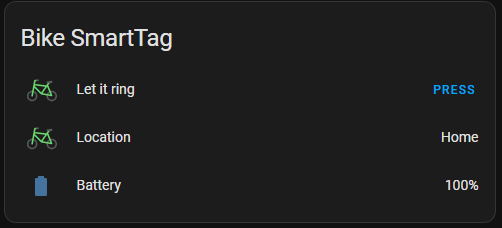
For each device, three entities are created:
device_tracker— current location (latitude, longitude, accuracy, last seen)sensor— battery level (not available for earbuds)button— ring the device
This integration does not let you react to SmartTag button presses; that's a separate problem with separate solutions.
About this fork
This is a maintained fork of
Vedeneb/HA-SmartThings-Find,
which was archived by its original author in 2024. Around the same time Samsung
rebuilt account.samsung.com as a JavaScript SPA backed by their new IAM /
OAuth2 stack (with DataDome bot protection), which broke the QR-code login the
original integration relied on. The SmartThings Find backend itself
(smartthingsfind.samsung.com) is unchanged.
Rather than re-implement the new login flow — fragile, mostly client-side, and likely to keep changing — this fork swaps it out for a one-time manual cookie paste. Once you're authenticated, everything else works as before.
Status and limitations
- Reverse-engineered API. Samsung can change anything server-side at any time and break things. Don't depend on this for anything that needs to be reliable.
- Cookie lifetime is unknown. In practice it lasts several weeks. When it expires, HA shows a Repair card and you re-paste a fresh cookie (see Reauthentication).
- No ring-stop for SmartTags. Once a tag is ringing, the integration can't silence it — Samsung doesn't expose that on the web. Other devices that do support stop-ringing aren't wired up here yet.
- Ring depends on Bluetooth proximity. A SmartTag will only ring if a Galaxy device is nearby to relay the request. If it doesn't ring from smartthingsfind.samsung.com, it won't ring from Home Assistant either. The SmartThings mobile app uses a different code path — a successful ring there does not mean the web/integration path works. Always sanity-check in the web UI.
Active vs. passive mode
- Passive mode: the integration just reads the last-known location Samsung has on file for the device. Cheap, but the location can be stale.
- Active mode: the integration sends a "request location update" first, which makes Samsung try to reach the device (e.g. your phone) over its current connection to get a fresh fix. More accurate, but it costs device battery and can wake the screen on phones/tablets.
Default: active for SmartTags, passive for everything else. To change either of those, or the update interval (default 120 s), go to Settings → Devices & Services → SmartThings Find → Configure.
Installation
Copy custom_components/smartthings_find/ into your Home Assistant
config/custom_components/ directory and restart Home Assistant.
If you want HACS-managed updates, add a GitHub mirror of this repository as a HACS custom repository — HACS only fetches from GitHub, so a Gitea/Forgejo mirror won't work. Setting that up is left as an exercise for the reader.
Setup
- In a normal browser, open smartthingsfind.samsung.com and log in.
- Open DevTools → Application (Chrome) or Storage (Firefox) →
Cookies →
smartthingsfind.samsung.com. Copy the value of theJSESSIONIDcookie (just the value, not the whole cookie header). - In Home Assistant, go to Settings → Devices & Services, click + Add Integration, and search for SmartThings Find — not the built-in SmartThings integration, which is a different thing.
- Paste the cookie into the form and submit. The integration validates the cookie against Samsung, fetches your devices, and creates entities.
Reauthentication
When the cookie expires, the integration surfaces it through HA's standard flow:
- A Repair appears under Settings → Repairs titled "Authentication expired for SmartThings Find", with a button that opens the same form you saw at setup.
- You can also trigger it proactively from the integration card's three-dot menu → Reconfigure.
Paste a fresh cookie (same way you did at setup), submit, done. No HA restart required.
Cleaning up devices
If a device is gone from your Samsung Find account (lost SmartTag, sold
phone, etc.), HA will keep the registry entries around. To remove them,
go to Settings → Devices & Services → SmartThings Find, click the
device, and use Delete in the three-dot menu. The integration permits
per-device removal. If the same dvceID ever comes back into Samsung's
list, the integration recreates fresh entries for it.
If a device is renamed in Samsung Find, HA picks up the new friendly name on the next reload, but the entity_id keeps its original slug. To bring the entity_id in line with the new name, use Settings → Devices & Services → SmartThings Find → ⋮ → Reload, then rename the entity_id manually under each entity's settings.
Debugging
Set the log level for the integration in configuration.yaml:
logger:
  default: info
  logs:
    custom_components.smartthings_find: debug
Development
A small pytest suite lives in tests/ and covers validate_jsessionid,
including a regression test for an aiohttp cookie-jar pollution bug. Run it:
pip install pytest pytest-asyncio aiohttp aioresponses pytz voluptuous
python -m pytest tests/ -v
The Home Assistant imports the integration touches are stubbed in
tests/conftest.py, so you don't need a full HA install to run tests.
License
MIT — see LICENSE.
Disclaimer
Third-party integration. Not affiliated with or endorsed by Samsung or SmartThings.